About This Page
Some of the everyday words that come up when we talk about I.T. are listed in the column headed ‘Terms’. Their meanings are given in the ‘Definitions’ column.
The Terms and their Definitions are both listed in alphabetical order.
If you click on a word or phrase in the Terms column, its definition will scroll to the top of the Definitions column.
You can also scroll through the definitions manually.
Terms
Definitions
App
A program run by the user.
‘App’ is an abbreviation for “application program”, meaning a program you can run yourself by clicking its icon or by typing its name at the ‘run’ prompt.
We use the term ‘app’ to distinguish the user-run programs from those that are started by the operating system and run automatically in the background.
Some standard apps (file manager, web browser, etc.) are supplied with the operating system and others can be installed by a user with administrator access.
Apps are not an integral part of the operating system. They can be safely installed and uninstalled without affecting the overall operation of the computer.
Each app relies on the services of the underlying operating system. Consequently, the Windows version of an app won’t run on an Apple Mac (and vice versa). So, when you install a new app, it’s important to choose the right version for your operating system.
Back to topCommunication Protocol
A set of rules for communication between computers.
There are many different communication protocols. Some govern how computers communicate over wired connections, others are for wireless connection methods.
Different communication mediums vary considerably in speed, reliability and how far a signal can travel. There are separate protocols for each of these technologies.
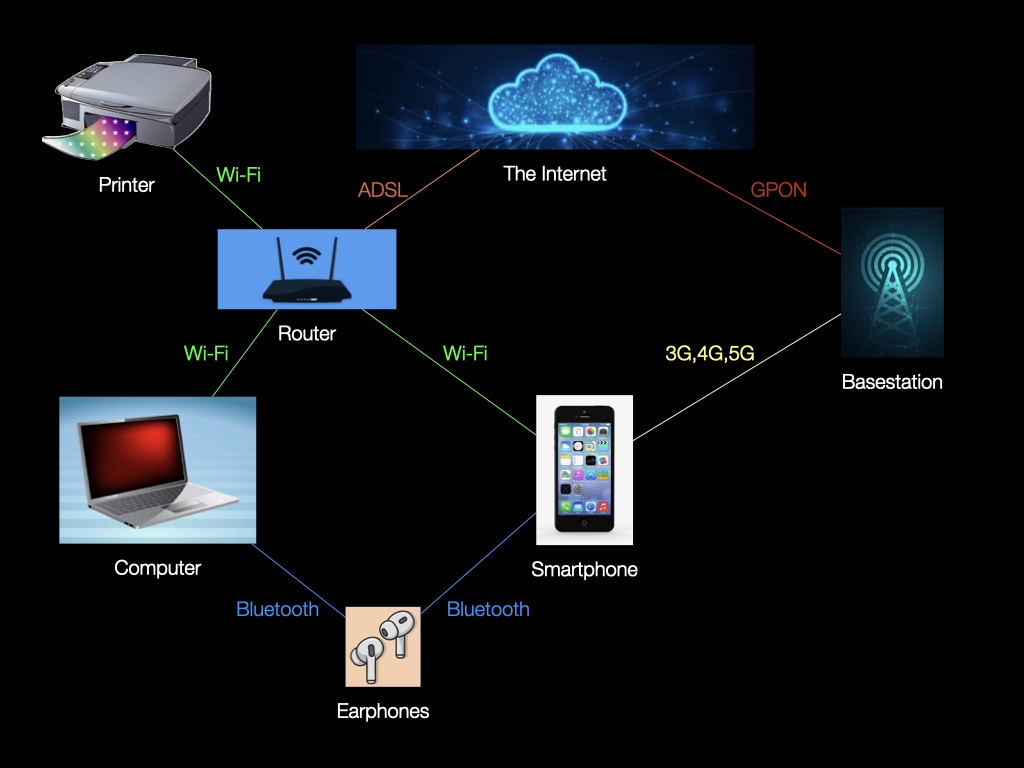
Some common protocols are shown in the diagram below.
More details
The data networks that connect our computers across the globe are very much like the roads that connect our towns and cities: just as there are country lanes, city streets, A-roads and motorways, so are there local connections with limited capacity, trunk routes with heavy traffic, and super-fast data highways.
The diagram above only shows the local connections. There is just one route from your laptop to your wi-fi router and only one out from there to your Internet Service Provider (ISP). No route planning is required.
But, there are many routes into and out of the Internet servers at your ISP. Furthermore, a message destined for the other side of the world will have to go through multiple communication hubs to get there. It is the job of the ISP’s routing software to select a suitable route and the TCP/IP protocol to manage the transmission through the intermediary nodes.
See also: Internet
Back to topComputer
An information processing machine.
Computers come in various forms. A personal computer may be a desktop, a laptop, a tablet, a phone, or a watch. There are also servers housed in racks in data centres, quantum computers in research establishments and tiny devices embedded in kitchen appliances and cars.
A computer can process information in a myriad of ways. It can store it for retrieval later. It can reformat it to make it easier to understand. It can filter out unnecessary detail. In fact, as the British mathematician, Alan Turing, proved in the 1930s, it can perform any operation that can be written down precisely.
Back to topFile
A collection of information in your computer’s long-term storage.
Files come in many different formats and vary greatly in size. Your documents, photos, music, videos and apps are all files.
Each file holds the information necessary for a particular purpose. A document file, for example, contains details of the fonts, paragraphs, margins, etc. that a word processor uses. Similarly, a photo file often contains information about the camera and when & where the photo was taken, in addition to the image itself.
In general, the data in a file is only meaningful to a particular type of app. So, for example, a file in the .docx format can be understood by a word processor app, but not by a music player.
A file can be as small as 0 bytes or so big that it takes up all the storage space you have available.
Back to topFolder
A collection of related files.
A folder can contain any number of files. It can also contain other folders.
For example, if you are a keen photographer, you might want to use a separate folder for each year and sub-folders for each month. If you took a photo of Alice in May 2025, you would file it in the Pictures/2025/05 folder.
Here, the Pictures folder contains the 2025 folder, which contains the 05 folder, which contains the photo of Alice.
Back to topHardware
The parts of a computer you can see and touch.
A computer’s hardware is the metal, the plastic and the semi-conductors that the machine is made of. It includes the case, the screen, the keyboard, the disk drives and the electronic chips.
The things you plug into a computer are also ‘hardware’: a power supply, a mouse, a pair of headphones, a USB memory stick, for example.
Back to topInternet
A global network of computers.
Each computer on the Internet can communicate with all the others because they all use the TCP/IP communication protocol.
Every machine on the Internet is allocated an Internet Protocol (IP) address. In the same way that a postal address has several parts (house number, street, city, country), so does an IP address.
Most IP addresses today have four parts. Each part is a number between 0 and 255; the full address consists of those four numbers separated by a dot: e.g. 192.168.1.107.
To ensure that each computer can be uniquely identified, IP addresses are allocated by the Internet Corporation for Assigned Names and Numbers (ICANN).
More details
The four-part format provides over 4 billion addresses, but that is not enough for today’s ever growing Internet. The IP protocol, therefore, also allows for bigger addresses with eight groups of four hexadecimal digits: e.g. 2001:0db8:0000:0000:0000:8a2e:0370:7334.
The 4-part address format was introduced in version 4 of the Internet Protocol (IPv4) and the 8-part format was added in version 6 (IPv6).
Memory
Like humans, computers have both short-term and long-term memories.
Information in short-term memory is lost when you switch off the power. When we just say ‘memory’, we mean ‘short-term’ memory. A typical PC will have 8GB or more of memory.
In contrast, long-term memory stores information indefinitely. We use the term storage for this. A typical PC will have 256GB or more of storage.
Back to topOperating System
An essential layer of software between the apps and the hardware.
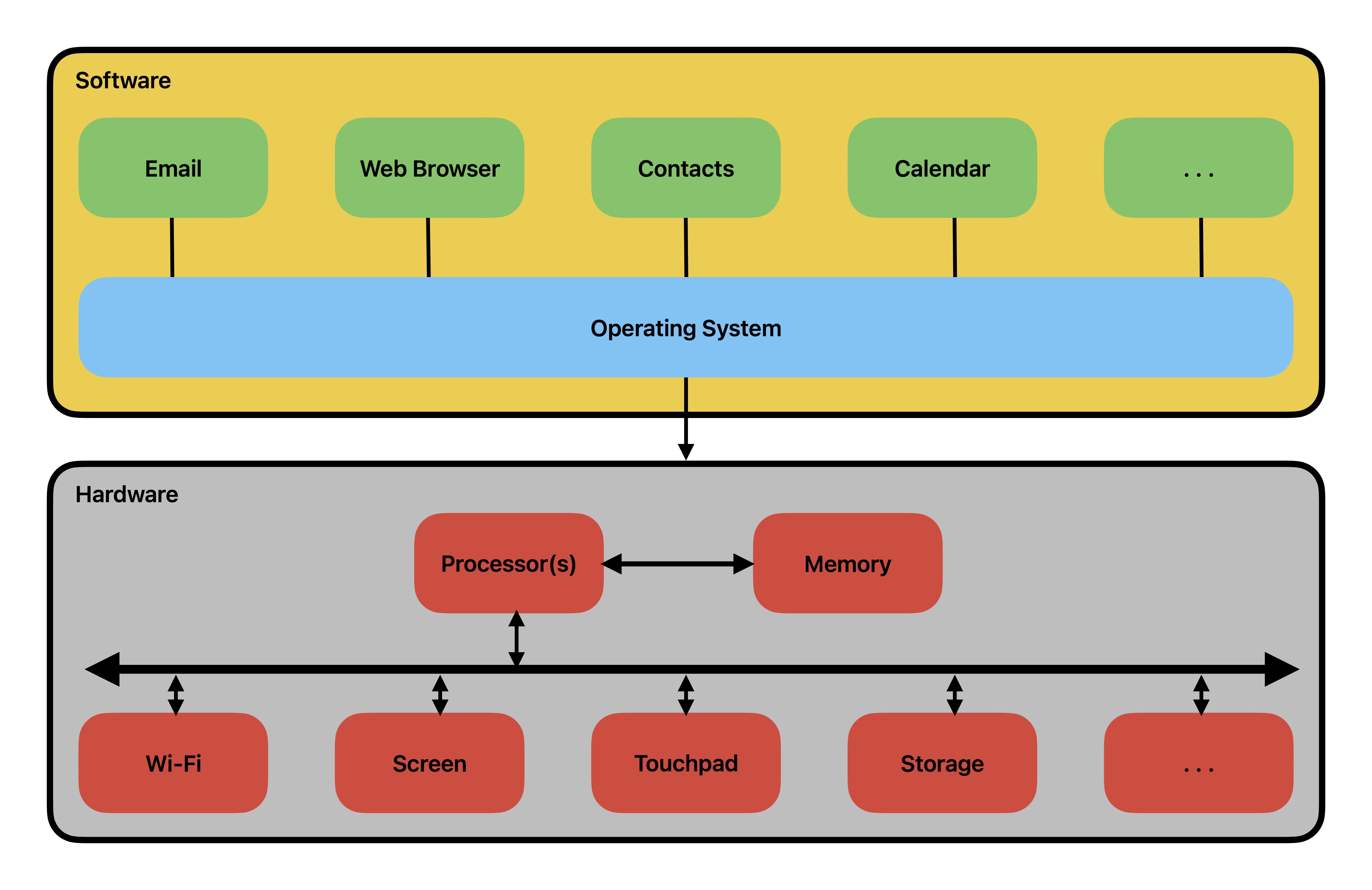
The operating system does three things:
- It provides apps with a single interface for all kinds of hardware.
- It shares the hardware between the apps.
- It enforces the fundamental security rules.
A software developer writing an app for Windows doesn't need to know whether your PC is made by HP or Dell or Lenovo because the operating system will use the appropriate manufacturer's device drivers.
There are always several apps running on your computer and they all need to use the central processor, the memory and the storage devices. They will also display information on the screen and respond to your keystrokes and mouse clicks. The operating system is responsible for sharing those devices among the apps.
The operating system is critical to the functioning of your PC. Its files are mostly invisible to the ordinary PC user and can only be updated by a user with administrator privilege. In addition, the files that you create as an ordinary user are not accessible to other users of your machine, or to remote systems. It is the operating system that enforces these protections.
Back to topSoftware
The instructions that a computer carries out.
When you turn on your computer, it runs the start-up instructions provided by your operating system. That will display your desktop, with icons that let you run the apps that are on your machine.
Each app is a recipe for some information processing. A word processor app, for example, contains instructions for creating and editing documents. A web browser app contains instructions for visiting websites.
Back to topStorage
Your computer’s long-term memory. (See Memory)
Information in storage is organised into files and folders:
- Files come in many different formats: .txt for simple text, .docx for word processor documents, .xlsx for spreadsheets, .html for web pages, .jpeg for photos, .exe or .app for apps, etc.
- Folders are containers for files and other folders.
The files and folders form a tree structure: the files are the leaves, the folders are the twigs and branches.
Your file manager app lets you restructure the tree by creating, deleting, copying, moving and renaming the files and folders.
Back to topWorld Wide Web
A global network of computers providing public services.
The World Wide Web allows any computer on the Internet to access documents published by another. For this to work, every published document has to have a unique identifier known as a Uniform Resource Locator (URL) or, simply, “web address”. The URL of this site’s Home page, for example, is ploid.org.uk.
A website is, essentially, a collection of documents in the HTML format. Each web page is a separate HTML file.
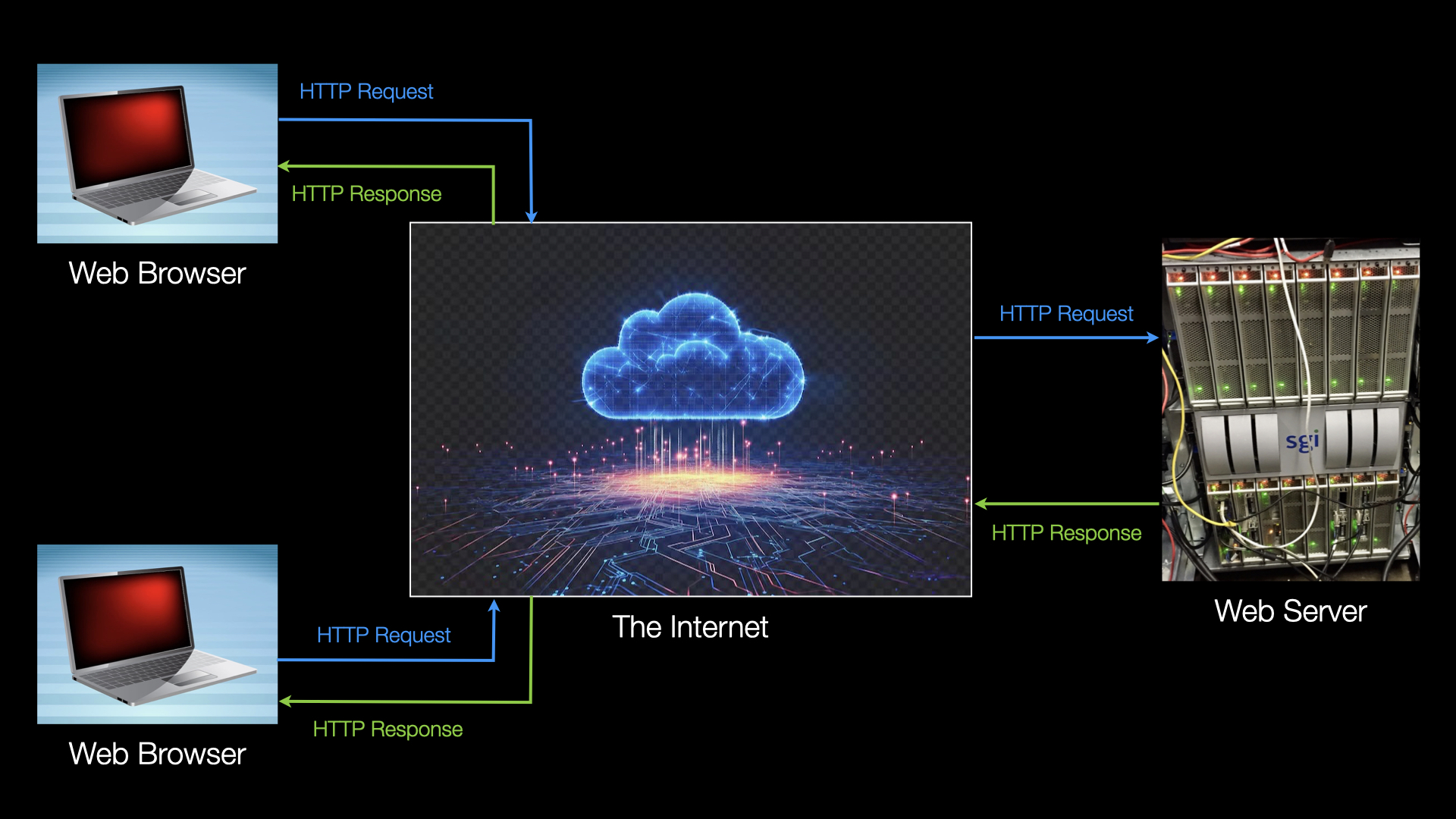
A computer that publishes web pages is called a server and the computers requesting those pages are its clients. The software that receives web page requests is a “web server”, and the apps that make those requests are “web browsers”.
The browser app on the client computer communicates with the appropriate web server using the Hypertext Transfer Protocol (HTTP) or, more commonly, its more secure version (HTTPS).
 Back to top